





Dune Awakening Sandbike Guide: How to Craft, Fuel & Maintain Your Desert Ride

Navigating the brutal deserts of Arrakis in Dune: Awakening can be lethal on foot. With giant sandworms lurking beneath the dunes and treacherous environmental hazards around every corner, having a vehicle is essential. The Sandbike is the first and most accessible vehicle you’ll build, and it becomes your lifeline early in the game. Fast, versatile, and customizable, the Sandbike ensures you cover ground quickly and safely.
This guide will walk you through everything you need to know to craft, assemble, maintain, and store your Sandbike in Dune: Awakening. Whether you’re a new player or optimizing your tech tree progression, this comprehensive breakdown has you covered.
Table of Contents
- 1 Unlocking the Sandbike: Begin with Research
- 2 Gathering Materials: Where to Find Sandbike Parts
- 3 Assembling Your Sandbike: Welding Torch Required
- 4 Customizing with Attachments: Boosters, Seats & More
- 5 Refueling Your Sandbike
- 6 Sandbike Maintenance: How to Repair Damage
- 7 Storing and Protecting Your Sandbike
- 8 Fast-Track Your Ride with GladiatorBoost
- 9 Final Thoughts
Unlocking the Sandbike: Begin with Research
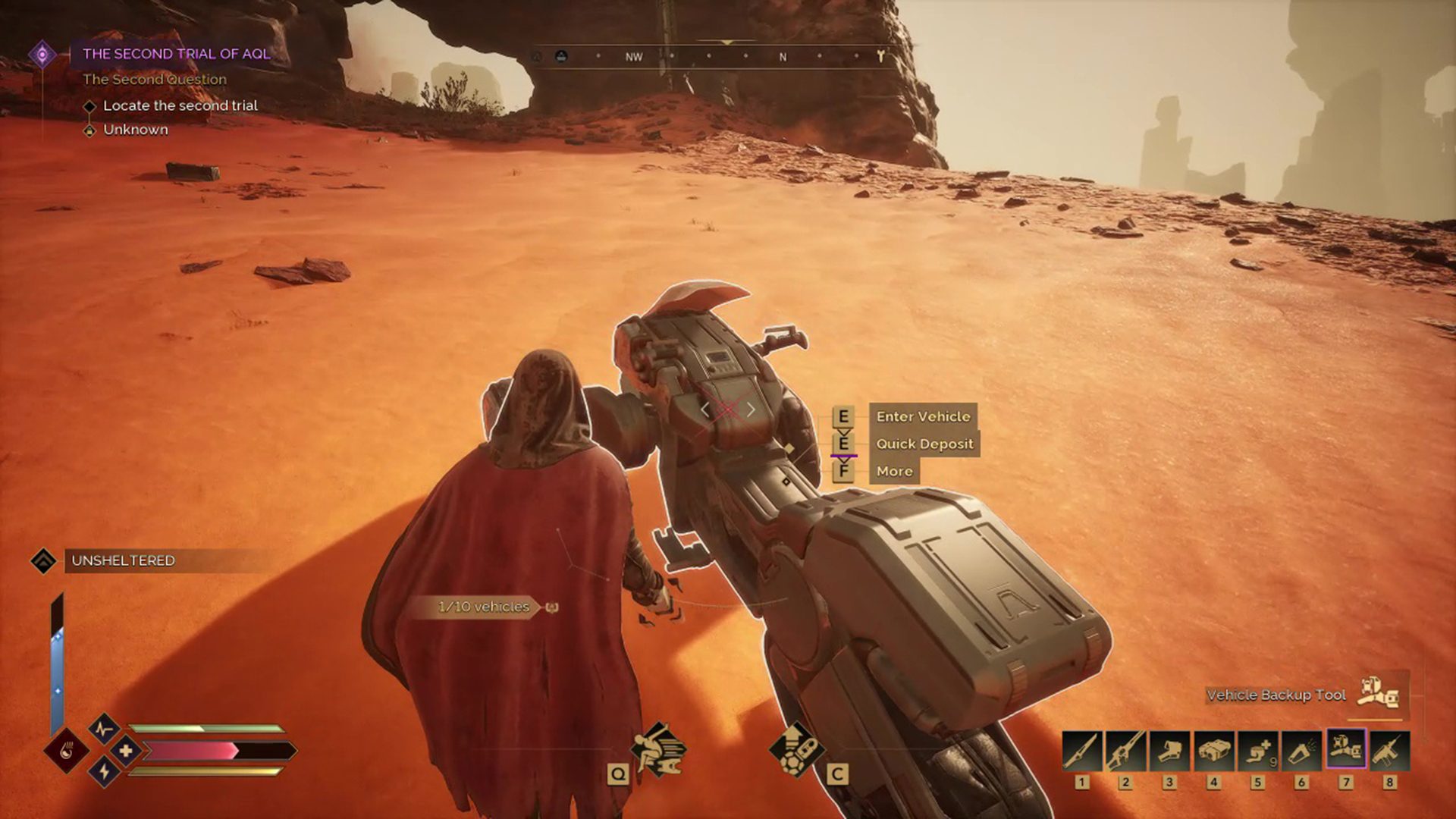
To craft your Sandbike, you’ll first need to unlock the Sandbike Mk1 Assembly Schematic from the Research tab. If your tech tree is locked, continue progressing through the Journey Quests until it becomes available.
Once unlocked, the schematic allows you to begin crafting individual Sandbike components using a Fabricator. These components include the chassis, PSU, engine, treads, and optional attachments.
Gathering Materials: Where to Find Sandbike Parts
Constructing a Sandbike requires both basic and specialized materials. You can gather these through several methods:
-
Imperial Testing Stations: These hostile areas contain valuable vehicle parts and tech. Be prepared for combat.
-
Underground Research Labs: Often filled with rare crafting materials and blueprints.
-
Trading Posts: Merchants occasionally stock Sandbike parts for sale, offering a peaceful acquisition route.
Before you begin crafting, ensure you’ve also gathered enough resources to build a Welding Torch, as this tool is necessary for assembly.
Assembling Your Sandbike: Welding Torch Required
Once you’ve crafted all essential parts, it’s time to build. Here’s how to do it:
-
Craft & Equip a Welding Torch at your Fabricator.
-
Place the Chassis on the ground in your buildable zone.
-
Attach each part manually: PSU, engine, treads, and optional modules (like backseats or boosters).
-
Use the Welding Torch to lock each component in place.
Assembly is hands-on, giving you control over customization and allowing for future upgrades.
Customizing with Attachments: Boosters, Seats & More
Your Sandbike isn’t just a basic ride—it can be outfitted with attachments that enhance performance or functionality:
-
Boosters: Increase speed temporarily.
-
Backseats: Allow another player to ride along.
-
Storage Modules: Carry additional gear or harvested materials.
When you attach a booster, a corresponding skill icon appears on-screen while riding. Activate it by pressing the assigned hotkey or controller button to unleash a burst of speed.
Refueling Your Sandbike
Your Sandbike consumes fuel to operate, and keeping it powered is essential for uninterrupted travel.
How to Refuel:
-
While near or riding the Sandbike, hold the Interact button.
-
Open the Interaction Wheel.
-
Select the Gas Can icon to begin refueling using fuel from your inventory.
How to Craft Fuel:
-
Process Fuel Cells at a Chemical Station.
-
Alternatively, find fuel in loot containers, wrecked vehicles, or buy it from merchants.
Always keep a few Fuel Cells in your inventory—running out mid-journey could leave you stranded in the desert.
Sandbike Maintenance: How to Repair Damage
Desert travel takes a toll on your vehicle. Sandbikes can’t be repaired at typical repair stations, so you’ll need to use your Welding Torch again.
Repair Steps:
-
Craft Welding Wire via your crafting menu.
-
Equip the Welding Torch.
-
Set it to Repair Mode.
-
Aim at the damaged part and press the Fire button to restore it.
Neglecting repairs will cause components to degrade further, so inspect your Sandbike regularly.
Storing and Protecting Your Sandbike
Leaving your Sandbike exposed outside your build zone for extended periods will lead to degradation. To preserve it, use the Vehicle Backup Tool.
How to Store:
-
Equip the Vehicle Backup Tool.
-
Point it at your Sandbike and press the Fire button.
-
The vehicle will be stored within the tool and protected from environmental damage.
How to Deploy:
-
Equip the Backup Tool and aim at open terrain.
-
Press Fire to summon your Sandbike instantly.
This method not only prevents passive wear but also offers flexibility in moving your vehicle between zones.
Fast-Track Your Ride with GladiatorBoost
Want to skip the grind and ride through Arrakis in style? Our Dune Awakening Vehicles Unlock Boost service at GladiatorBoost offers fast, efficient unlocking of your Sandbike and other key vehicles. Whether you’re behind in tech progression, short on crafting materials, or simply prefer to hit the sand sooner, our professional boosters ensure you gain mobility without the hassle. Start strong, travel far—GladiatorBoost has your ride ready.
Final Thoughts
The Sandbike is your gateway to faster exploration, safer travel, and greater freedom in Dune: Awakening. From crafting to customization, every step in the process is designed to be immersive and rewarding. As you expand your reach across Arrakis, upgrading and maintaining your Sandbike will remain essential to your survival and success.
Whether you’re racing through the dunes or escaping a sandworm by seconds, mastering your Sandbike is a must for any true Fremen-in-training. So fire up your Fabricator, grab that Welding Torch, and ride the sands with confidence.
Related Guides
ARC Raiders Red Coral Jewelry Farming Guide: Best Locations and Fastest Loot Routes
Best Early Cars in Forza Horizon 6: Fastest Budget Unlocks for New Players
Forza Horizon 6 House Locations Guide: Every Home, Price, Perk, and Unlock Requirement
Black Ops 7 Zombies Wonder Weapons Ranked: The Ultimate Tier List