





Battlefield 6 Guide: Fastest Ways to Complete Vehicle Repair Challenges

Table of Contents
- 1 Introduction: The Return of Battlefield’s Vehicle Warfare
- 2 How Vehicle Repairs Work in Battlefield 6
- 3 Why Vehicle Repair Challenges Can Be Tricky
- 4 Fastest Method: Using Custom Bot Modes
- 5 Bonus Tips to Optimize Repair Speed
- 6 Common Mistakes to Avoid
- 7 GladiatorBoost’s Battlefield 6 Boosting
- 8 Final Thoughts
Introduction: The Return of Battlefield’s Vehicle Warfare
Battlefield 6 continues the franchise’s legacy of large-scale, chaotic battles — and at the heart of that chaos are the game’s vehicles. From tanks and helicopters to armored buggies and jets, vehicles play a vital role in determining victory. But with great firepower comes vulnerability. Every vehicle can take damage from rockets, mines, or anti-vehicle fire, and unless repaired, they’ll eventually go up in flames.
To encourage teamwork and mastery of the Engineer class, Battlefield 6 includes Vehicle Repair Challenges that reward players for keeping their team’s war machines in the fight. Unfortunately, these challenges can take a while to complete if you’re only relying on random opportunities in regular matches.
This guide will show you how to complete vehicle repair challenges quickly and efficiently, whether you’re grinding for XP, unlocking cosmetics, or completing your battle pass milestones.
How Vehicle Repairs Work in Battlefield 6
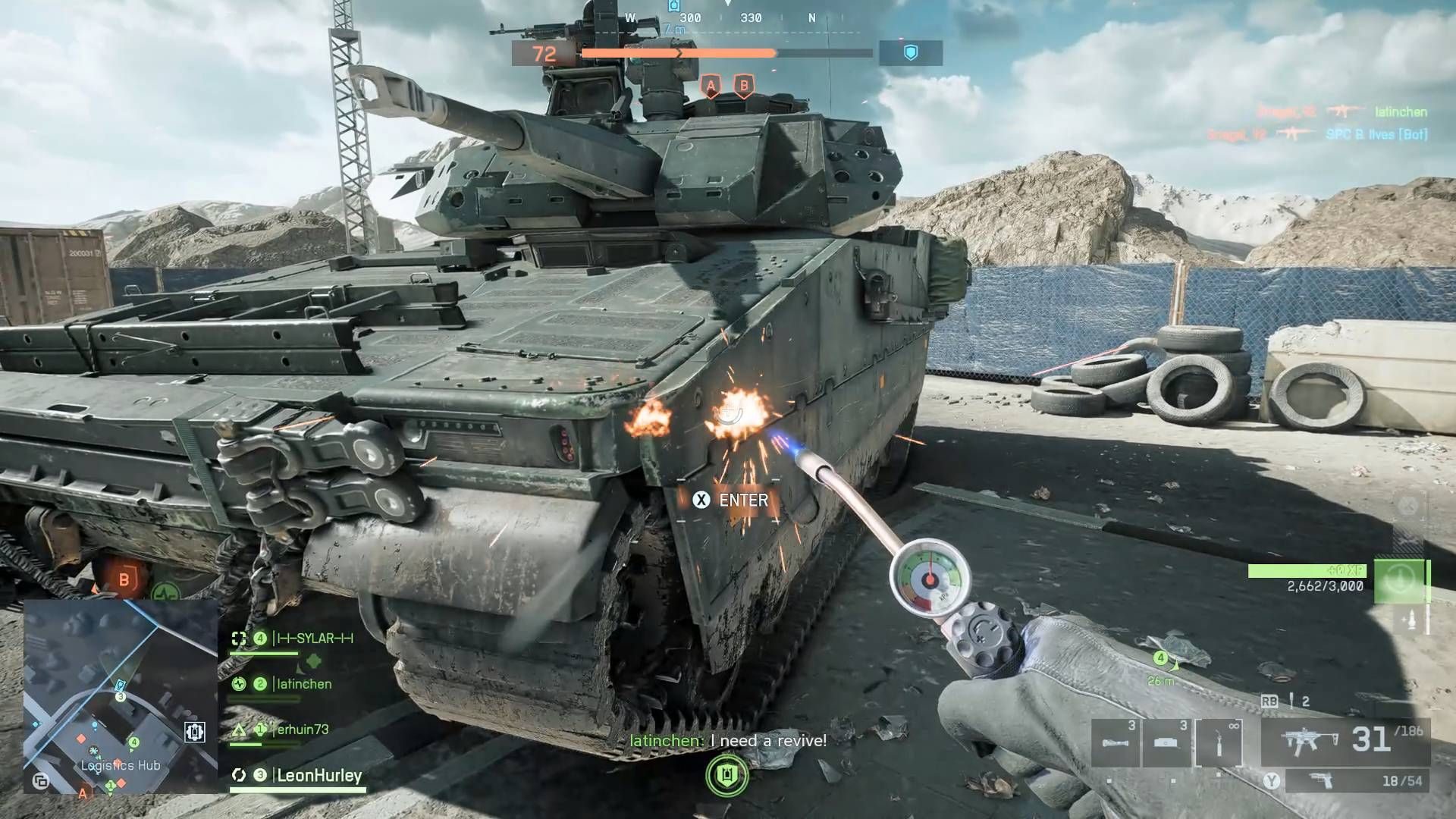
The Engineer class is the only one that can repair vehicles in Battlefield 6. Equipped with the Repair Tool, Engineers can restore the HP of both ground and air vehicles — whether piloted by themselves or their teammates.
How to Repair Vehicles: Step-by-Step
-
Select the Engineer Class:
Before the match starts, choose the Engineer class from the loadout screen. This automatically equips you with the Repair Tool in your utility slot. -
Equip the Repair Tool:
-
Console: Press the D-Pad Up to equip the tool.
-
PC: Press the X key to switch to it.
-
-
Locate a Damaged Vehicle:
Find a friendly vehicle that has taken damage — look for smoke, fire, or a partially depleted HP bar. -
Begin Repairs:
Approach the vehicle and hold your fire button (RT / Mouse 1) to begin repairing. You’ll see the HP bar gradually refill. -
Cooldown Management:
The repair tool doesn’t use ammo but overheats after prolonged use. When this happens, wait a few seconds for it to cool down before continuing. -
Repair Range:
You need to be within close proximity to the vehicle for the tool to work. Moving too far away will cancel the repair animation.
Pro Tip: Always position yourself behind cover while repairing to avoid being sniped or caught in explosions.
Why Vehicle Repair Challenges Can Be Tricky
Repair challenges might sound easy, but completing them in live multiplayer can be frustrating for a few reasons:
-
Vehicles often explode before you can reach them.
-
Teammates may abandon damaged vehicles instead of calling for help.
-
Enemy fire zones make it risky to stand near vehicles for long periods.
-
Repair progress doesn’t count if you die mid-repair or the vehicle is destroyed prematurely.
To bypass these issues, the most efficient way to complete repair challenges is through custom game modes with bots — where you can safely farm repair points without constant combat pressure.
Fastest Method: Using Custom Bot Modes
One of Battlefield 6’s best features is its Player-Created Experiences, accessible from the Community tab. These allow you to load into custom maps with bots — ideal for farming challenge progress quickly and safely.
Here’s how to set it up:
Step 1: Access the Community Tab
From the main menu, select “Community” → “Search Experiences.”
Step 2: Configure Game Settings
-
Mode: Conquest
-
Map: Operation Firestorm (or any large open map)
-
Keyword: “Bots”
-
Sort By: Popular or Recently Updated
This will filter out older or broken lobbies and show active custom games where progression and XP still count.
Step 3: Check “Other Progression” Options
Before joining, ensure the Other Progression boxes (for XP, weapon unlocks, and challenge tracking) are checked. This ensures your challenge progress counts just like in normal multiplayer matches.
Step 4: Join and Spawn as an Engineer
Once loaded into the match:
-
Select Engineer as your class.
-
Spawn at HQ/Base, where multiple vehicles are available.
Step 5: Create Damage Scenarios for Repairs
-
Enter one vehicle (like a tank or buggy) and fire at another friendly vehicle nearby to lower its HP.
-
Exit your vehicle and use the Repair Tool to restore the damaged vehicle.
-
Repeat the process by damaging, repairing, and rotating between vehicles.
Controller Tip:
On Xbox, press A to switch seats in multi-seat vehicles.
On PlayStation, press X to do the same.
This lets you damage the vehicle while seated in the turret, then quickly swap to the driver’s seat or exit to repair it.
By repeating this cycle for about 10–15 minutes, you can complete multiple vehicle repair challenges in a single session — far faster than in normal multiplayer.
Bonus Tips to Optimize Repair Speed
-
Use Light Vehicles for Speed:
Smaller vehicles like buggies or jeeps can be damaged and repaired much faster than heavy tanks, saving time per cycle. -
Stay Near the HQ:
The HQ zone respawns destroyed vehicles, letting you constantly access new ones if you accidentally over-damage or destroy them. -
Pair with a Friend:
If you’re playing with a friend, take turns damaging each other’s vehicles and repairing them. This is the fastest and safest way to complete the challenges. -
Use the Repair Tool Continuously:
The Repair Tool gives XP for each tick of repair, so keep holding it even when HP is nearly full to maximize gain per second. -
Don’t Forget to Cool Down:
Overheating resets your progress momentarily — short bursts of repairs help keep uptime consistent.
Common Mistakes to Avoid
-
Destroying vehicles completely: If the HP hits zero, it explodes, wasting progress. Stop shooting early and repair before it’s totaled.
-
Joining XP-disabled servers: Some custom lobbies disable progression. Always check that XP gain is enabled.
-
Ignoring seat-switch controls: Switching seats allows for easy self-damage and repair cycles without waiting on teammates.
-
Standing in open areas: You’re a sitting duck while repairing — even bots can interrupt progress if you’re too exposed.
GladiatorBoost’s Battlefield 6 Boosting
Grinding repair challenges, weapon unlocks, and XP milestones in Battlefield 6 can take a long time — especially when you’re juggling work, school, or other commitments. That’s where GladiatorBoost’s Battlefield 6 Boosting services can help. Their professional boosters can efficiently complete challenges, unlock class upgrades, or even rank up your Engineer specialization while keeping your account safe and secure. Whether you want faster progression or just more time to enjoy the action, GladiatorBoost provides a trusted shortcut for serious Battlefield players.
Final Thoughts
Completing Vehicle Repair Challenges in Battlefield 6 doesn’t have to be a grind. By using custom bot modes, optimizing your Engineer loadout, and following the repair-damage loop efficiently, you can finish these objectives in under an hour — all while gaining valuable XP and class progression.
Vehicles are the backbone of Battlefield 6’s large-scale warfare, and mastering repairs not only helps you earn rewards faster but also makes you an invaluable teammate. Whether you’re playing solo or with a squad, the key to quick progression is smart preparation and efficient execution.
Related Guides
ARC Raiders Red Coral Jewelry Farming Guide: Best Locations and Fastest Loot Routes
Best Early Cars in Forza Horizon 6: Fastest Budget Unlocks for New Players
Forza Horizon 6 House Locations Guide: Every Home, Price, Perk, and Unlock Requirement
Black Ops 7 Zombies Wonder Weapons Ranked: The Ultimate Tier List