






In Marathon, each Runner Shell offers unique abilities that dramatically affect how players approach combat and looting. One of the most creative abilities in the game belongs to the Thief Shell, which allows players to deploy the Pickpocket Drone.
This ability gives players the power to remotely steal valuable items from enemies without directly engaging them. However, using the drone effectively requires smart positioning, awareness, and good timing.
This guide explains how the Pickpocket Drone works in Marathon, how to control it, and the best strategies for using it to steal high-value loot.
Table of Contents
- 1 What the Pickpocket Drone Is
- 2 How to Activate the Pickpocket Drone
- 3 How to Control the Drone
- 4 How the Drone Steals Items
- 5 The Risk of Using the Drone
- 6 Using the Drone for Reconnaissance
- 7 Interacting With the Environment
- 8 Recovering Stolen Loot
- 9 Best Strategies for Using the Pickpocket Drone
- 10 Why the Pickpocket Drone Is Valuable
- 11 Final Thoughts
What the Pickpocket Drone Is
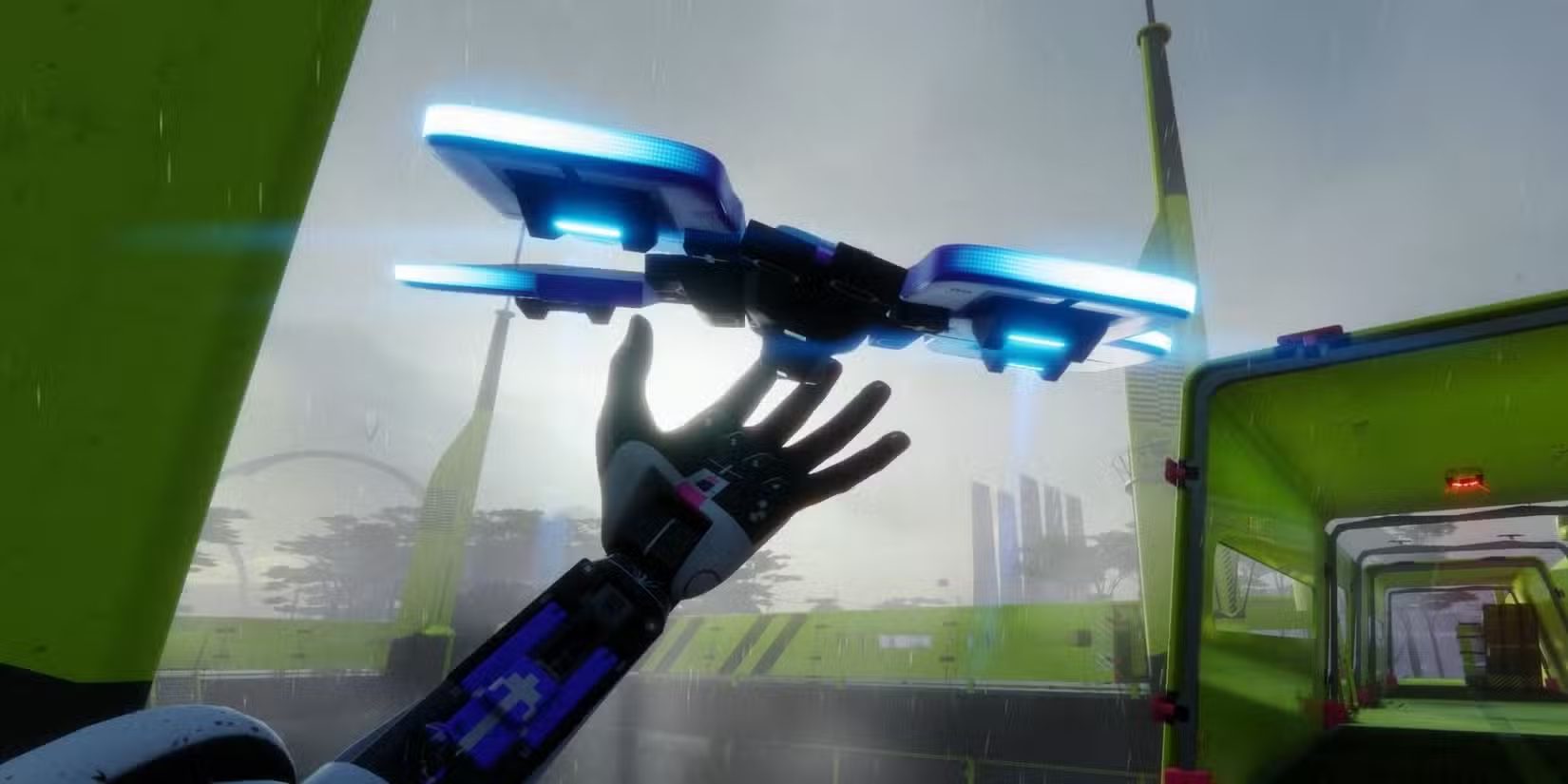
The Pickpocket Drone is the Prime Ability of the Thief Runner Shell. Once activated, the player launches a small remote-controlled drone that can fly through the environment.
While controlling the drone, you temporarily leave your Runner stationary in the world. During this time you directly pilot the drone to scout areas, interact with objects, and steal items from enemies.
Because of its unique mechanics, the Pickpocket Drone is useful for:
-
Stealing valuable loot from enemy Runners
-
Scouting dangerous areas
-
Interacting with objects from a safe distance
-
Retrieving items without exposing yourself
When used properly, the ability can generate massive advantages during high-risk extraction runs.
How to Activate the Pickpocket Drone
Before using the ability, your Prime Ability meter must fully charge during the match.
Once the ability is ready, activate it using the following controls:
Controller
-
L1/LB + R1/RB
Keyboard
-
Q
After activation, the drone launches and you immediately switch to a remote control view, allowing you to pilot it freely for a short period.
The drone remains active until:
-
The ability timer expires
-
The drone is destroyed
-
You cancel the ability
Understanding the controls is essential to use the drone efficiently.
How to Control the Drone
Piloting the Pickpocket Drone is relatively simple, but mastering it takes practice.
The drone can move freely through the environment, allowing you to adjust:
-
Direction
-
Flight height
-
Movement speed
The drone is small and agile, which makes it difficult for enemies to notice at first.
However, it can still be destroyed if enemy players spot it.
Because of this, flying carefully and avoiding open areas increases your chances of successfully stealing loot.
How the Drone Steals Items
The primary purpose of the Pickpocket Drone is to steal items directly from other players.
When you fly close enough to another Runner, the drone highlights the target with a green outline, indicating they are within range.
To steal an item:
-
Approach the target with the drone.
-
Wait for the target outline to appear.
-
Fire the tether hook using the ability button.
The drone launches a hooked tether toward the enemy player.
If successful, the tether grabs an item from their inventory and transfers it to the drone.
What Items Does the Drone Steal?
The drone always steals the most valuable item currently carried by the enemy.
This means you can potentially steal:
-
Rare loot items
-
Valuable crafting materials
-
Mission objectives
-
High-tier gear
However, if the stolen item seems worthless, it likely means the target wasn’t carrying anything valuable.
The Risk of Using the Drone
While the Pickpocket Drone is powerful, it also has a major drawback.
When you activate the ability, your Runner becomes completely immobile.
This means:
-
You cannot move or fight
-
You cannot defend yourself
-
Enemies can easily eliminate you
Because of this vulnerability, using the drone recklessly can result in quick deaths.
Players often activate the drone behind cover or inside buildings to reduce risk.
Some squads even assign teammates to guard the Thief while the drone is deployed.
Using the Drone for Reconnaissance
Stealing items isn’t the only use for the Pickpocket Drone.
Another powerful feature is recon scouting.
Because the drone can fly freely, it can safely explore areas before your team enters them.
This allows players to:
-
Check buildings for enemies
-
Locate loot containers
-
Identify ambushes
-
Track player movement
In Trios mode, the Thief can fly the drone into enemy territory and relay information to teammates.
This intelligence allows your squad to:
-
Plan coordinated attacks
-
Avoid dangerous fights
-
Set traps for unsuspecting players
Smart teams use the drone not just for stealing loot but for strategic battlefield awareness.
Interacting With the Environment
The Pickpocket Drone can also interact with certain environmental objects.
For example, it can:
-
Open doors
-
Close doors
-
Collect items from the ground
This allows players to retrieve loot from locations that might be dangerous to enter.
For example, if you previously dropped an item inside a building filled with enemies, the drone may be able to grab it without risking your life.
This makes it one of the most versatile abilities in Marathon.
Recovering Stolen Loot
After successfully stealing an item, the drone stores it temporarily.
You must fly the drone back to your character to collect the loot.
Once the drone reaches you, the item transfers to your inventory.
However, there is a risk.
If the drone gets destroyed while carrying stolen items, the loot drops at the location where the drone was destroyed.
This means you must travel to that spot manually if you want to retrieve it.
In dangerous situations, this can make the stolen item extremely difficult to recover.
Best Strategies for Using the Pickpocket Drone
Using the ability effectively requires more than just flying toward enemies.
Here are some useful strategies.
Activate the Drone From Cover
Always hide your character behind solid cover before launching the drone.
Walls, buildings, and elevated positions work best.
Target Players Carrying Loot
Players who recently looted high-value areas are more likely to carry rare items.
Watching them before striking increases your chances of stealing something valuable.
Use the Drone During Fights
Enemy players focused on combat are less likely to notice the drone.
This is a great opportunity to steal their best gear.
Scout Before Pushing
Send the drone into buildings or contested areas before your team enters.
Knowing where enemies are located can save your squad from ambushes.
Fly Carefully
The drone is fragile and can be destroyed easily if spotted.
Avoid hovering in obvious locations.
Why the Pickpocket Drone Is Valuable
Among all Runner abilities in Marathon, the Pickpocket Drone is one of the most strategic.
It provides advantages that go beyond simple combat:
-
Safe reconnaissance
-
Risk-free looting
-
Strategic ambush planning
-
Stealing rare items from enemies
Players who master this ability can generate massive economic advantages during extraction runs.
Some players also accelerate their progression through a Marathon Boosting service, especially when farming rare gear or unlocking advanced equipment.
Others prefer acquiring gear through community trading, where you may find items for sale in marathon that help improve your loadouts faster.
Final Thoughts
The Pickpocket Drone is one of the most unique abilities in Marathon. By allowing players to remotely steal loot, scout enemy positions, and interact with the environment, it opens up creative strategies that go far beyond traditional combat.
However, the ability also carries risk, since your Runner remains completely vulnerable while controlling the drone.
Players who learn how to deploy the drone safely, target valuable enemies, and recover stolen loot effectively will gain a major advantage during their runs.
With practice and smart positioning, the Pickpocket Drone can become one of the most powerful tools in your Marathon arsenal.
Related Guides
ARC Raiders Red Coral Jewelry Farming Guide: Best Locations and Fastest Loot Routes

Best Early Cars in Forza Horizon 6: Fastest Budget Unlocks for New Players
Forza Horizon 6 House Locations Guide: Every Home, Price, Perk, and Unlock Requirement
Black Ops 7 Zombies Wonder Weapons Ranked: The Ultimate Tier List