






Inventory management plays a huge role in Marathon, especially since the game revolves around collecting valuable loot during extraction runs. The more items you bring back safely, the more Credits and gear upgrades you can secure for future missions.
However, many players quickly discover that the default inventory space is quite limited. With only a small number of slots available at the start, it’s easy to run out of space before finishing a run.
This guide explains how to increase inventory space in Marathon, how backpacks work, where to obtain them, and how to unlock the largest carrying capacity available.
Table of Contents
- 1 Default Inventory Capacity in Marathon
- 2 How Backpacks Increase Inventory Space
- 3 How to Obtain Backpacks in Marathon
- 4 Looting Backpacks During Runs
- 5 Earning Backpacks Through Contracts and Progression
- 6 Buying Backpacks in the Armory
- 7 Backpack Unlock Requirements
- 8 Carrier Capstone Upgrade Bonus
- 9 Best Strategy for Maximizing Inventory Space
- 10 Why Inventory Space Matters in Marathon
- 11 Final Thoughts
Default Inventory Capacity in Marathon
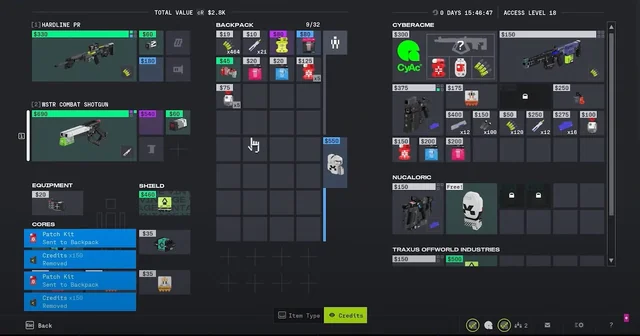
When you first begin playing Marathon, your character starts with a base carrying capacity of 16 slots.
These slots must hold everything you extract with, including:
-
Weapons
-
Materials
-
Mission items
-
Consumables
-
Equipment
Because valuable loot often appears throughout a match, a limited inventory means you may need to leave items behind.
The solution is equipping a larger backpack, which increases the number of available inventory slots.
How Backpacks Increase Inventory Space
Backpacks are special equipment items that expand your carrying capacity.
They occupy a dedicated Backpack Slot, meaning you can only equip one backpack during a run.
However, you can store multiple backpacks in your inventory or vault and swap them before missions.
The larger the backpack, the more slots you gain.
Backpack Types and Inventory Bonuses
Here are the three backpack tiers available in Marathon:
| Backpack | Additional Slots |
|---|---|
| Enhanced Backpack (8XS Basepack) | +8 inventory slots |
| Deluxe Backpack (16XS Basepack) | +16 inventory slots |
| Superior Backpack (24XS Basepack) | +24 inventory slots |
If you equip the best available backpack, your total carrying capacity can increase from 16 base slots up to 40 slots, allowing you to extract with significantly more loot.
Because extra inventory space directly increases profit potential during runs, many players prioritize upgrading their backpacks early in the game.
How to Obtain Backpacks in Marathon
Backpacks can be acquired in several different ways.
Understanding these methods will help you expand your inventory capacity much faster.
Looting Backpacks During Runs
The most common way to obtain backpacks is simply finding them during missions.
Backpacks may appear in:
-
Loot containers
-
Supply crates
-
High-value locations
-
Dead enemy players
If another player is carrying a better backpack than you, eliminating them can allow you to claim their gear.
However, since backpack spawns are random, relying only on looting can take time.
Players who want to speed up gear acquisition sometimes use a Marathon boosting website to obtain equipment more efficiently.
Earning Backpacks Through Contracts and Progression
Some contracts and progression milestones also reward backpacks.
As you complete faction missions and increase your reputation, you may receive backpacks as part of:
-
Contract completion rewards
-
Rank-up rewards
-
Special event drops
These rewards are not guaranteed but can occasionally provide upgrades without spending Credits.
Still, the most reliable method of obtaining backpacks comes from the Armory.
Buying Backpacks in the Armory
The Armory allows players to purchase specific backpacks directly using Credits.
However, you cannot immediately buy the best backpack.
Each backpack must first be unlocked through CyberAcme faction upgrades.
This means you’ll need to progress your reputation with CyberAcme before gaining access to better inventory gear.
Many players who want immediate upgrades choose to buy backpacks in Marathon once the required unlocks become available.
Backpack Unlock Requirements
Below is a breakdown of how each backpack becomes available in the Armory.
Enhanced Backpack (8XS Basepack)
Requirements:
-
Reach CyberAcme Rank 5
-
Unlock the Carrier Upgrade
Cost:
-
500 Credits
This backpack adds 8 extra inventory slots, bringing your total to 24 slots.
It’s typically the first major inventory upgrade most players acquire.
Deluxe Backpack (16XS Basepack)
Requirements:
-
Reach CyberAcme Rank 15
-
Unlock the Carrier Upgrade+
Cost:
-
2,750 Credits
This backpack increases your inventory by 16 additional slots, bringing your capacity to 32 slots.
At this stage, players can comfortably extract with much larger amounts of loot.
Superior Backpack (24XS Basepack)
Requirements:
-
Unlock the Max Looter Capstone Upgrade
-
Unlock 30 CyberAcme upgrade nodes
Cost:
-
8,250 Credits
The Superior Backpack is the largest backpack currently available in Marathon.
It adds 24 inventory slots, giving players a total capacity of 40 slots when equipped.
This massive storage capacity allows players to carry significantly more resources and high-value loot during runs.
Carrier Capstone Upgrade Bonus
Another important upgrade related to inventory management is the Carrier Capstone Upgrade.
This upgrade is unlocked by progressing even further in the CyberAcme faction.
Requirements:
-
Unlock 38 upgrade nodes
Once unlocked, players using the Rook Shell can start each run with a Deluxe Backpack equipped automatically.
This means you no longer need to risk losing your backpack early in a match.
It’s one of the most valuable long-term upgrades for players who frequently run high-value loot routes.
Best Strategy for Maximizing Inventory Space
Simply owning a backpack is not enough. Efficient inventory management also requires planning.
Here are a few strategies to maximize your carrying capacity.
Prioritize Backpack Upgrades Early
Upgrading to at least the Enhanced Backpack early in the game will significantly improve your loot efficiency.
More space means more items extracted per run.
Target High-Value Loot Areas
If you have a large backpack, focus on areas known for rare loot spawns.
With more inventory slots available, you can gather multiple high-value items before extracting.
Store Spare Backpacks in Your Vault
If you find additional backpacks, store them for later runs.
This ensures you always have backup equipment if you lose one during a failed extraction.
Upgrade CyberAcme Reputation
Progressing CyberAcme reputation unlocks the best inventory upgrades and purchasing options.
It also opens access to better gear and crafting opportunities.
Buy Gear When Needed
Some players prefer to save time by purchasing equipment instead of farming it repeatedly.
Services offering items for sale marathon can help players quickly replace lost gear or upgrade their loadouts.
Why Inventory Space Matters in Marathon
Inventory capacity has a direct impact on your progression.
More inventory space allows you to:
-
Extract with more valuable items
-
Earn more Credits per run
-
Carry additional crafting materials
-
Complete contracts more efficiently
-
Reduce the need for multiple farming runs
In an extraction shooter like Marathon, maximizing the value of every successful run is crucial.
Players with larger backpacks can consistently bring back more loot, accelerating their progression and improving their loadouts.
Final Thoughts
Increasing your inventory space in Marathon is essential if you want to maximize the rewards from each mission.
Starting with only 16 inventory slots, players must rely on backpacks to expand their carrying capacity. By upgrading through the CyberAcme faction and purchasing stronger backpacks in the Armory, you can eventually reach a maximum of 40 inventory slots.
Whether you obtain backpacks through looting, contracts, or the Armory, upgrading your inventory should be one of your top priorities early in the game.
With a larger backpack and smarter inventory management, you’ll be able to extract with more valuable loot and progress through Marathon much faster.
Related Guides
ARC Raiders Red Coral Jewelry Farming Guide: Best Locations and Fastest Loot Routes

Best Early Cars in Forza Horizon 6: Fastest Budget Unlocks for New Players

Forza Horizon 6 House Locations Guide: Every Home, Price, Perk, and Unlock Requirement
Black Ops 7 Zombies Wonder Weapons Ranked: The Ultimate Tier List