





Mastering Bipod Deployment in Battlefield 6: Full Setup & Combat Guide

Battlefield 6 introduces a dynamic and tactical layer to its combat system through weapon customization, and one of the most useful yet often overlooked attachments is the bipod. Designed for precision and control, the bipod attachment can completely change the way you approach long-range firefights, especially when using Light Machine Guns (LMGs) and sniper rifles. Understanding how to deploy it correctly — and when — can be the difference between dominating the battlefield and becoming an easy target.
In this guide, we’ll cover how to equip and deploy the bipod in Battlefield 6, what it actually does, the best situations to use it, and some advanced tips for maximizing your stability and accuracy in combat.
Table of Contents
- 1 What Is the Bipod in Battlefield 6?
- 2 How to Equip a Bipod in Battlefield 6
- 3 How to Deploy the Bipod in Battlefield 6
- 4 What the Bipod Actually Does
- 5 Tactical Tips for Effective Bipod Use
- 6 Advanced Deployment Situations
- 7 Integrating the Bipod Into Your Loadout Strategy
- 8 Battlefield 6 Boosting with GladiatorBoost
- 9 Conclusion
What Is the Bipod in Battlefield 6?
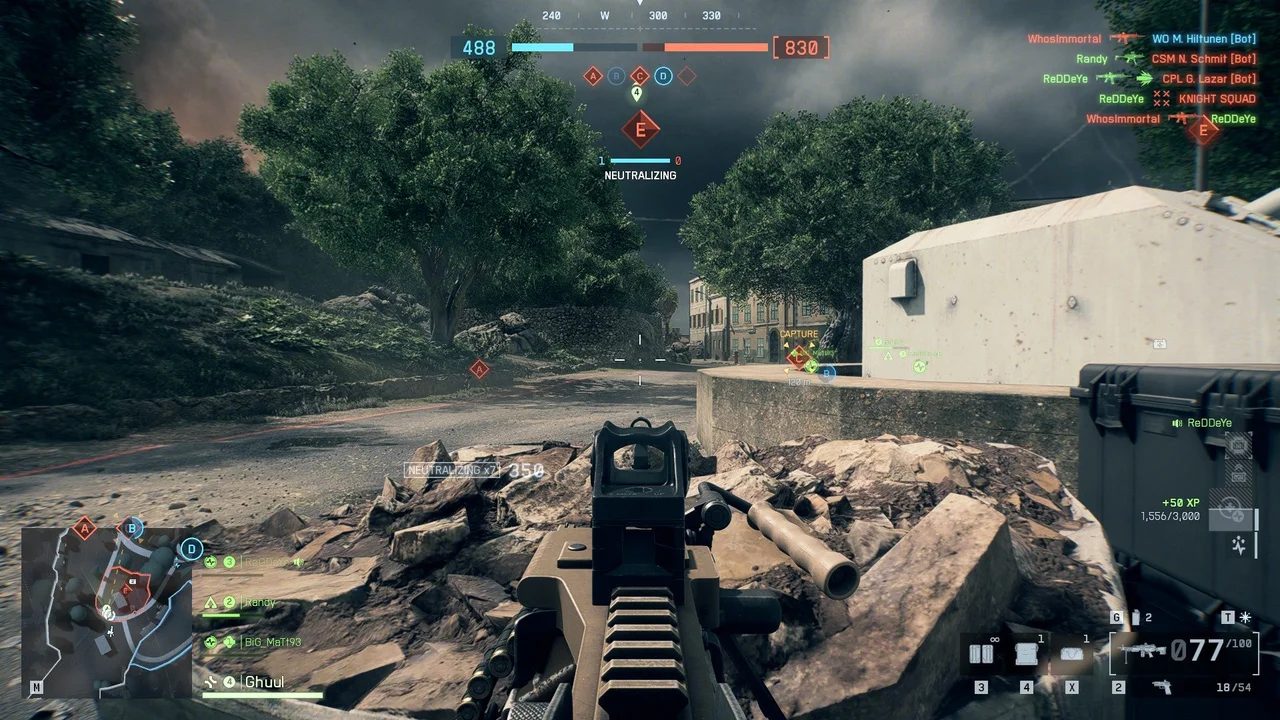
The bipod is an underbarrel weapon attachment that stabilizes your weapon when mounted or deployed, drastically reducing recoil and sway. It effectively turns your weapon into a mounted gun, allowing you to fire with extreme accuracy over long distances. For players who rely on steady aim — such as Recon snipers or Support players using LMGs — the bipod is invaluable.
When deployed correctly, the bipod:
-
Reduces recoil to nearly zero
-
Eliminates weapon sway
-
Increases shot grouping accuracy
-
Allows for longer sustained fire
However, using the bipod comes with trade-offs. Once deployed, your movement is heavily restricted, leaving you vulnerable if you’re not positioned behind solid cover.
How to Equip a Bipod in Battlefield 6
Before you can deploy the bipod in combat, you need to equip it in your loadout. Not every weapon in Battlefield 6 supports a bipod, so it’s important to know which ones can use it.
-
Open the Loadout Menu – Navigate to your soldier customization screen before entering a match or while in deployment.
-
Select the Weapon – Choose the gun you want to customize. LMGs and sniper rifles often have the bipod unlocked by default.
-
Go to the Underbarrel Slot – The bipod is found under the “Underbarrel” attachment category.
-
Equip the Bipod – Select it and confirm your loadout changes.
-
Save Your Configuration – Ensure the attachment is active before starting your next mission or match.
If you’re using weapons like DMRs (Designated Marksman Rifles) or Assault Rifles, you may need to increase weapon mastery to unlock the bipod attachment.
How to Deploy the Bipod in Battlefield 6
Once you’ve equipped the bipod, deployment in the field is simple — but it must be done under specific conditions. The bipod can only be deployed when your weapon is positioned on a stable surface or when you’re prone.
Steps to Deploy:
-
Find a Stable Surface or Go Prone
You can deploy the bipod when lying flat on the ground or when aiming over low cover such as sandbags, walls, or rocks. -
ADS (Aim Down Sights)
While aiming down sights, you’ll notice an on-screen prompt indicating you can deploy the bipod. -
Press the Deployment Key
-
Keyboard: Press V
-
Controller: Press R3 (click the right stick)
-
Once deployed, your weapon locks into position. You’ll notice a dramatic reduction in recoil, allowing precise, consistent shots. However, your field of view becomes limited — you can only pivot within a horizontal arc and cannot turn freely without undeploying the bipod.
What the Bipod Actually Does
The bipod’s main purpose is to provide stability and precision, especially in long-range or suppression scenarios. Here’s what it improves:
-
Weapon Stability: Almost completely removes vertical recoil.
-
Accuracy: Tightens bullet spread, allowing pinpoint control over sustained fire.
-
Scope Control: Removes scope sway when sniping, making it easier to hold a steady aim on distant targets.
-
Suppression Power: Perfect for controlling choke points and suppressing enemy advances with LMGs.
However, players must remember the bipod’s biggest weakness — immobility. Once deployed, you become stationary and can’t quickly reposition. If caught in the open, you’re a prime target for snipers or flankers. Smart positioning is key.
Tactical Tips for Effective Bipod Use
-
Choose Cover Wisely – Deploy behind solid cover that shields you from most angles. Walls, vehicles, or elevated positions work best.
-
Stay Aware of Your Surroundings – Keep teammates nearby who can cover your blind spots.
-
Don’t Overcommit – The bipod is powerful but situational. Undeploy and relocate often to avoid being predictable.
-
Use with Suppression Weapons – LMGs like the PKP-BP or M240B excel with a bipod, turning them into makeshift turrets.
-
Snipers Benefit Too – For Recon players, the bipod removes scope sway, allowing clean, calm shots at long range.
Advanced Deployment Situations
Certain terrain and objects in Battlefield 6 offer partial bipod deployment, allowing you to mount the weapon even without going fully prone. For example:
-
Window ledges
-
Crates and barriers
-
Hills or terrain slopes
These situations provide versatility — you gain stability without sacrificing too much mobility. Try experimenting with different spots across maps to find the ideal positions for your playstyle.
Integrating the Bipod Into Your Loadout Strategy
Think of the bipod as a specialized attachment, not a must-have for every engagement. Fast-paced, close-quarter maps may not benefit much from it. However, on large, open maps or when defending objectives, it becomes one of the most effective attachments in your arsenal.
Balancing mobility with firepower is the essence of effective bipod use. Switch between a bipod loadout for defense and a mobility-focused setup for offense to maintain tactical flexibility.
Battlefield 6 Boosting with GladiatorBoost
If you’re looking to improve your performance or reach higher ranks faster, GladiatorBoost’s Battlefield 6 Boosting services can help you unlock attachments like the bipod more efficiently. Their expert boosters and professional players offer tailored services that help you grind experience, rank up weapons, and gain mastery rewards — all without the tedious grind. Whether you’re aiming to unlock specific gear, improve your KD ratio, or climb the leaderboards, GladiatorBoost ensures a smooth and safe experience for every Battlefield 6 player.
Conclusion
The bipod in Battlefield 6 is a game-changer for precision-based players. Whether you’re holding a defensive line or setting up a long-range ambush, mastering bipod deployment allows for superior accuracy and control. Just remember — it’s not about always using the bipod, but knowing when and where to deploy it for maximum impact.
Understanding the balance between mobility and stability will elevate your gameplay — turning your soldier into a lethal force capable of holding entire sectors with precision and confidence.
Related Guides
ARC Raiders Red Coral Jewelry Farming Guide: Best Locations and Fastest Loot Routes
Best Early Cars in Forza Horizon 6: Fastest Budget Unlocks for New Players
Forza Horizon 6 House Locations Guide: Every Home, Price, Perk, and Unlock Requirement
Black Ops 7 Zombies Wonder Weapons Ranked: The Ultimate Tier List