





Phasmophobia Character Customization Guide: How to Unlock Outfits, Accessories & Investigator Styles

Phasmophobia has evolved far beyond its original minimalist ghost-hunting experience. With the introduction of the Player Character Update, players can now personalize their investigators using new models, outfits, accessories, and cosmetic progression systems.
Customization adds a new layer of identity to the game. Instead of entering haunted locations with generic characters, players can now create investigators that reflect their style, progression, and achievements.
Whether you want a professional paranormal investigator aesthetic, a casual ghost hunter look, or a prestige-heavy veteran appearance, Phasmophobia’s updated customization system gives players more ways to stand out in multiplayer lobbies.
This guide explains:
- How to customize your character in Phasmophobia
- How to unlock cosmetics
- Every customization category
- How Prestige affects cosmetics
- What customization options are currently available
- How future cosmetic systems may expand
Table of Contents
- 1 How Character Customization Works in Phasmophobia
- 2 How to Access Character Customization
- 3 Choosing Your Investigator Model
- 4 Appearance Customization Options
- 5 Clothing Customization in Phasmophobia
- 6 Outfit System Explained
- 7 How to Customize Your ID Badge
- 8 Why ID Badges Matter
- 9 How to Save Character Changes
- 10 How to Unlock More Cosmetics
- 11 No Microtransactions or Paid Cosmetics
- 12 Prestige Levels and Cosmetic Progression
- 13 Best Ways to Unlock Cosmetics Faster
- 14 Best Cosmetic Combinations
- 15 Will More Cosmetics Be Added?
- 16 Why Customization Matters in Horror Games
- 17 How Customization Improves Multiplayer
- 18 Progression Tips for New Players
- 19 Common Questions About Character Customization
- 20 Final Thoughts
How Character Customization Works in Phasmophobia
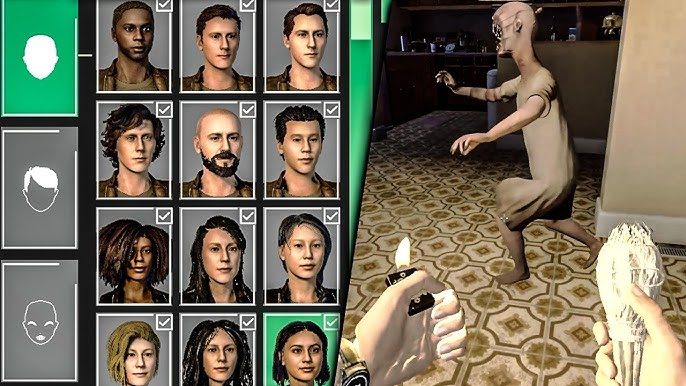
The Player Character Update introduced a dedicated customization system accessible directly from the in-game shop.
Instead of assigning random default investigators, players can now:
- Choose investigator models
- Change clothing
- Equip accessories
- Customize ID badges
- Unlock achievement cosmetics
This system ties directly into progression and long-term gameplay.
How to Access Character Customization
To customize your character:
- Enter the main lobby
- Walk to the in-game shop near the pinboard
- Open the shop menu
- Select the “Customization” tab at the bottom
Inside this menu, you can begin editing nearly every aspect of your investigator.
Choosing Your Investigator Model
One of the biggest additions in the update is the expanded investigator roster.
Players now have access to multiple new character models with different appearances and styles.
Currently, there are 12 investigator models available.
These models differ in:
- Facial appearance
- Body structure
- Hairstyles
- Visual identity
This immediately gives players more individuality during multiplayer sessions.
Appearance Customization Options
Each investigator can be further personalized with smaller appearance details.
Current options include:
- Hair color
- Glasses
- Piercings
- Accessories
These changes help players create more unique-looking ghost hunters instead of identical team compositions.
While the system is still expanding, the current setup already offers far more personalization than earlier versions of Phasmophobia.
Clothing Customization in Phasmophobia
The clothing section allows players to change multiple outfit categories.
You can currently customize:
- Hats
- Jackets
- Shirts
- Pants
Each clothing piece includes multiple color options, allowing players to mix styles and create unique outfit combinations.
Even though the clothing selection is currently somewhat limited, future updates are expected to significantly expand cosmetic variety.
Outfit System Explained
Players may notice a “Coming Soon” section related to full outfits.
This strongly suggests Phasmophobia plans to introduce:
- Complete outfit sets
- Themed cosmetics
- Matching apparel collections
- Event-exclusive costumes
Kinetic Games appears to be building a larger progression-based cosmetic ecosystem over time.
How to Customize Your ID Badge
One of the most interesting features is the ID badge customization system.
The final customization tab allows players to modify:
- Badge appearance
- Prestige displays
- Achievement rewards
- Event unlocks
Your badge essentially acts as a visible progression showcase for other players in multiplayer lobbies.
Why ID Badges Matter
ID badges are more than cosmetic flair.
They represent:
- Experience level
- Event participation
- Prestige progression
- Challenge completion
- Long-term activity
Veteran players can immediately display their accomplishments without needing separate ranking systems.
How to Save Character Changes
One important detail confuses many players initially.
You cannot save your customization unless:
- You equip an owned item
OR - Purchase the equipped item first
If you attempt to leave the menu without valid equipment ownership, the changes may not save properly.
How to Unlock More Cosmetics
Most cosmetics in Phasmophobia are earned through gameplay progression rather than direct purchases.
Current unlock methods include:
- Challenges
- Seasonal events
- Achievements
- Prestige levels
- Gameplay milestones
This system keeps progression tied closely to active play.
No Microtransactions or Paid Cosmetics
One major aspect players appreciate is that Phasmophobia currently avoids traditional cosmetic monetization.
There are:
- No paid skins
- No premium outfit stores
- No cosmetic DLC packs
- No cash shop purchases
All customization items are unlocked through gameplay progression.
This approach has been praised heavily by the community because it rewards dedication rather than spending.
Prestige Levels and Cosmetic Progression
Prestige now plays a larger role in customization progression.
As players gain Prestige levels, they can unlock:
- New badges
- Cosmetic rewards
- Exclusive customization options
- Veteran status visuals
Because Prestige progression can require substantial playtime, many players interested in advanced unlocks explore progression-focused services like Buy Phasmophobia prestige levels to accelerate long-term account development.
Best Ways to Unlock Cosmetics Faster
Complete Weekly Challenges
Challenges frequently reward:
- Experience
- Event progress
- Cosmetic unlock requirements
Participate in Seasonal Events
Holiday events often introduce:
- Limited-time badges
- Special cosmetics
- Event-exclusive unlocks
Missing these events may prevent future access to certain rewards.
Focus on Prestige Grinding
Prestige remains one of the largest long-term progression systems tied to cosmetic unlocks.
Efficient XP farming can significantly accelerate unlock speed.
Play Multiplayer Consistently
Multiplayer investigations often provide:
- Faster XP gains
- More successful contracts
- Efficient challenge completion
Best Cosmetic Combinations
Although customization options are still growing, players commonly create themes such as:
- Professional investigator
- Urban paranormal hunter
- Retro ghost detective
- Tactical horror team
- Casual exploration outfits
The flexibility of color customization helps create more individuality even with limited base clothing selections.
Will More Cosmetics Be Added?
Almost certainly.
The current system clearly lays the foundation for future expansion.
Expected future additions may include:
- More outfit categories
- Animated cosmetics
- Event apparel
- Additional hairstyles
- Gloves and footwear
- Horror-themed skins
- Prestige-exclusive outfit sets
The “Coming Soon” sections strongly indicate ongoing development plans.
Why Customization Matters in Horror Games
Customization systems in cooperative horror games improve:
- Player identity
- Multiplayer immersion
- Long-term progression motivation
- Social recognition
Phasmophobia especially benefits because players spend significant time in co-op lobbies preparing investigations together.
Distinct investigator appearances help teams feel more personal and memorable.
How Customization Improves Multiplayer
In multiplayer matches, cosmetics help:
- Differentiate teammates quickly
- Showcase experience
- Display event participation
- Create roleplay immersion
For content creators and dedicated players, customization also adds entertainment value during streams and cooperative sessions.
Progression Tips for New Players
If you are just starting:
- Prioritize XP farming
- Learn ghost evidence systems
- Complete daily objectives
- Participate in events early
- Save resources for useful unlocks
Efficient progression naturally accelerates cosmetic access.
Players aiming to optimize progression, unlock Prestige rewards quickly, and maximize account advancement often use services like Phasmophobia Boosting to streamline leveling and challenge completion.
Common Questions About Character Customization
How do I customize my character in Phasmophobia?
Go to the in-game shop and select the Customization tab near the bottom of the menu.
How many investigator models are available?
There are currently 12 investigator models.
Can I unlock cosmetics without spending money?
Yes. All cosmetics are earned through gameplay progression.
Are there microtransactions?
No. Phasmophobia currently does not sell cosmetic items through microtransactions.
What unlocks cosmetics fastest?
Prestige progression, events, achievements, and challenge completion are the primary methods.
Final Thoughts
The Player Character Update represents one of the biggest quality-of-life improvements Phasmophobia has introduced in years.
By expanding personalization systems, Kinetic Games transformed investigators from generic placeholders into customizable characters tied directly to player progression and achievements.
Although the cosmetic system is still growing, the foundation is already strong:
- Multiple investigator models
- Outfit customization
- Prestige rewards
- Badge personalization
- Event-based unlocks
Most importantly, the game keeps all cosmetics tied to gameplay rather than paid monetization, preserving the cooperative progression-focused identity that made Phasmophobia successful in the first place.
As future updates continue expanding customization options, the system will likely become one of the core progression pillars for long-term players.
Related Guides
ARC Raiders Red Coral Jewelry Farming Guide: Best Locations and Fastest Loot Routes
Best Early Cars in Forza Horizon 6: Fastest Budget Unlocks for New Players
Forza Horizon 6 House Locations Guide: Every Home, Price, Perk, and Unlock Requirement
Black Ops 7 Zombies Wonder Weapons Ranked: The Ultimate Tier List